
Your Guided Tour Regarding How to Use DailyVent Journal
When you visit your journal page, you’ll see several intuitive sections designed to guide your writing practice:
Mood Selection Bar
Located at the top, this bar features seven emotional categories:

- All Emotions: Mixed prompts from all categories
- 😠 Anger: Prompts for processing frustration and irritation
- 😰 Anxiety: Questions to address worries and nervousness
- 😥 Stress: Guided writing for overwhelm and pressure
- 😌 Gratitude: Exercises to cultivate thankfulness
- 🤔 Reflection: Prompts for self-discovery and insight
- 😊 Joy: Questions to amplify happiness and appreciation
How to use it: Click any mood button to receive a relevant prompt. The active button will highlight in purple.
Prompt Display Section
This is where your guided writing begins. You’ll see:
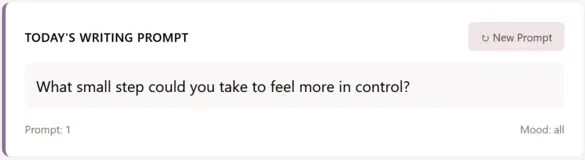
- Today’s Writing Prompt: The main prompt area displays your selected question
- Prompt Counter: Tracks how many prompts you’ve viewed
- Mood Indicator: Shows your currently selected emotion
- “New Prompt” Button: Generates another prompt from your selected category
Main Writing Area
The heart of your journal features:
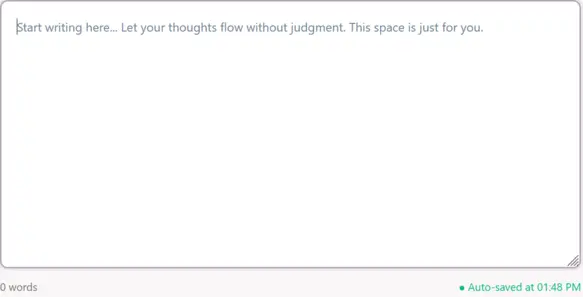
- A spacious, clean text area with comforting placeholder text
- Automatic word count tracking below the text box
- Auto-save indicator showing when your work is securely saved
Action Button Bar
Three essential tools for your practice:

- ↻ New Prompt: Quickly generates another prompt
- ⬇ Download Entry: Saves your writing as a text file
- ✕ Clear Page: Resets everything (with confirmation)
Privacy Assurance Notice

The persistent reminder at the bottom confirms: “Your privacy is protected: All writing remains in your browser. Nothing is saved to our servers unless you download it.”
Do you want to start journaling prompts using our tool?
Watch Video Guide
Step-by-Step: Your First Journaling Session
Follow this simple workflow to get the most from your practice:
- Choose Your Emotional Starting Point
- Visit your journal page and notice what emotion feels most present
- Click the corresponding mood button (or start with “All Emotions”)
- Read your first prompt carefully
- Begin Writing Freely
- Don’t edit as you write—let thoughts flow naturally
- Ignore spelling, grammar, or “making sense”
- Write for at least 5 minutes without stopping
- Use the Tools as Needed
- If you get stuck, click “New Prompt” for fresh inspiration
- Watch your word count grow (aim for 250-500 words)
- Notice the auto-save indicator confirming your work is safe
- Conclude Your Session
- When finished, you can leave your entry for tomorrow
- Or download it as a keepsake using the download button
- Return tomorrow and continue where you left off
Key Features & How They Support Your Mental Health Practice
🔒 Privacy by Design
- Local Browser Storage: All writing automatically saves to your device’s local storage
- No Cloud Storage: Nothing transmits to any server
- Complete Control: You decide if/when to download or clear entries
- Session Persistence: Your work remains between visits to the same browser
This privacy-focused approach reduces the inhibition many feel when journaling, allowing for truly honest self-expression—a cornerstone of therapeutic writing benefits.
🔄 Smart Prompt System
- 56 Curated Prompts: Developed around evidence-based therapeutic writing techniques
- Emotion-Focused Categories: Based on common emotional states needing processing
- Non-Repeating Logic: Prompts won’t repeat until you’ve seen all in a category
- Randomized Delivery: Fresh perspectives each time you click “New Prompt”
The prompt system addresses “blank page anxiety” while providing the structured guidance research shows maximizes journaling’s mental health benefits.
💾 Automatic Saving & Recovery
- Real-time Saving: Every keystroke is secured locally
- Session Recovery: Accidentally closed the browser? Your text returns when you come back
- Long-term Storage: Entries persist between browser sessions indefinitely
- Manual Backup Option: Download button creates timestamped text files
This eliminates the fear of losing vulnerable writing, encouraging consistent practice.
Advanced Tips for Maximizing Benefits
Creating a Sustainable Ritual
- Time Anchor: Journal at the same time daily (morning for clarity, evening for processing)
- Environment Cue: Light a candle, make tea, or play soft music to signal journaling time
- Duration Goal: Start with 5 minutes, gradually extend to 15-20 as habit forms
- Prompt Strategy: Use specific moods to address current emotions, or rotate through all categories weekly
Therapeutic Writing Techniques to Try
- Stream of Consciousness: Write continuously without stopping for your time goal
- Prompt Response: Answer the prompt directly, then let writing expand organically
- Dialogue Writing: Write a conversation between you and your emotion/worry/joy
- Gratitude Amplification: Use gratitude prompts, then list 3-5 specific related blessings
Integration with Broader Mental Wellness Practice
- Pre-Therapy Preparation: Journal before sessions to clarify what to discuss
- Post-Therapy Processing: Write after sessions to integrate insights
- Mood Tracking: Note which emotions you select over time to identify patterns
- Progress Review: Monthly, download entries to observe growth and recurring themes
Troubleshooting Common Questions
Q: Where is my writing actually saved?
A: In your web browser’s local storage. You can verify this in Chrome via: Developer Tools → Application → Local Storage → Your site URL.
Q: Can I access my journal from multiple devices?
A: No—this is intentional for privacy. Your journal exists only in the browser where you write. For multi-device access, use the download/upload method.
Q: What happens if I clear my browser data?
A: Local storage clears with browser data. Always download important entries if planning to clear data.
Q: Can I customize the prompts?
A: Currently, prompts are fixed to ensure therapeutic quality. Future versions may allow customization.
Q: Is there a mobile experience?
A: Yes! The journal is fully responsive and works beautifully on phones and tablets.
The Science Behind the Design
DailyVent Journal incorporates several evidence-based principles:
- Expressive Writing Protocol: Based on James Pennebaker’s research showing 15-20 minutes of focused writing improves mental and physical health
- Emotional Granularity: Mood categories help develop specific emotional awareness
- Barrier Reduction: By eliminating login requirements and privacy concerns, the tool increases adherence
- Structured Flexibility: Prompts provide direction while allowing personal exploration
Creating Your Personal Journaling Sanctuary
Your journaling practice works best when treated as sacred self-care time. Consider:
- Bookmark Your Journal Page: Create easy, one-click access
- Use Full-Screen Mode: Press F11 to minimize distractions
- Pair with Breath Work: Take 3 deep breaths before beginning
- Set an Intention: Briefly note what you hope from today’s session
- Close Ritually: Thank yourself for showing up, then close the tab
When to Seek Additional Support
While daily journaling significantly boosts mental wellness, it complements—doesn’t replace—professional care. Consider consulting a mental health professional if you experience:
- Persistent low mood or anxiety interfering with daily life
- Thoughts of harming yourself or others
- Trauma or grief needing specialized processing
- Any mental health concern that feels unmanageable alone
Organizations like Psychology Today, GoodTherapy, or the APA Psychologist Locator can help find appropriate support.
Start Your Journey Today
The most powerful step is the first one. Visit your journal page now, select a mood that resonates, and begin. There’s no perfect way to journal—only your way. With DailyVent Journal’s private, guided environment, you have the ideal tool to build a transformative daily practice that grows with you.
Remember: This isn’t about creating perfect writing. It’s about creating an honest conversation with yourself. Your mind will thank you.